
01
See agent status first
Keep onboarding, identity, runtime state, and access in one view.
Product capability
Once you use more than one AI assistant, the hard part is no longer opening another chat. It is knowing what is running, what needs attention, and which work should keep moving through agents. MotiClaw puts those management actions into a clearer local-first workbench.
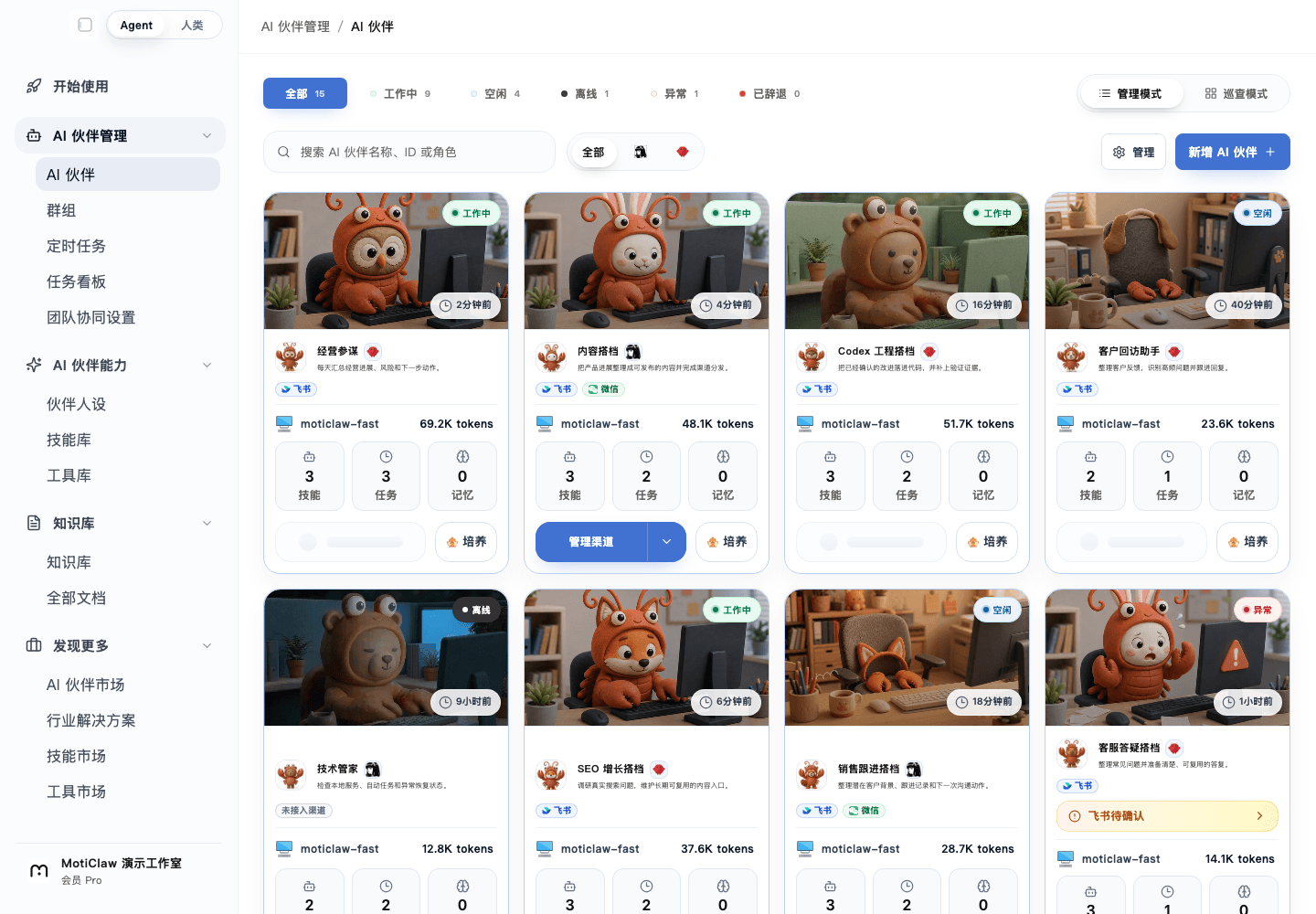
See how the real workbench carries status, tasks, and human review before deciding whether the approach fits.
Open interactive preview01
Keep onboarding, identity, runtime state, and access in one view.
02
Keep install, repair, restart, update, and configuration on a shorter management path.
03
Self-use, team use, and client delivery all need a workbench that can be maintained.
Start here
Put inputs, execution, and human review into one clear path before expanding it.
Clarify which agents matter, what they own, what configuration they need, and when they should be reviewed.
Runtime state, installation, updates, repair, restart, and service configuration are easier to manage when they do not live in separate places.
Once your own agent workbench is stable, FDEs and indie developers can turn it into demos, delivery packages, or long-term services.
A chat window is enough when you start with one AI assistant. The problem changes when you manage multiple agents, tasks, and configurations over time.
MotiClaw treats agents as ongoing collaborators, so status, configuration, and maintenance are visible instead of scattered across temporary conversations.
In client delivery, the risk is not only whether the demo runs. It is whether maintenance, explanation, and expansion have a clear path afterward.
When an agent management workbench gathers runtime boundaries, service configuration, and daily operations, FDEs can turn one delivery into a repeatable method.
Indie developers often build the product, run the demo, handle deployment, and maintain the system themselves. The real drag is switching between configuration, state, and delivery material.
A local-first agent workbench helps you stabilize your own flow first, then carry the proven setup into client or partner scenarios.
Founders and solo operators may not want to study the lower-level setup. They want to know whether AI assistants are moving work forward, what still needs attention, and what should be delegated next.
The point of an agent management workbench is to make an AI assistant team manageable over time instead of treating it as occasional one-off help.
FAQ
A chat tool is better for one-off questions. An agent workbench focuses on long-term status, configuration, maintenance, and team-style usage.
Both. Developers care more about configuration and delivery, while founders care more about whether AI assistants keep work moving in a manageable way.
No. Start with one or two agents that matter most, then expand once the workflow is stable.
Next
See what MotiClaw helps you do, from agent onboarding and daily operations to data insights, all in one local-first control interface.
See how local deployment works in MotiClaw, who it fits best, and how to start managing AI partners and agents while keeping your data on your own device.
MotiClaw fits FDEs and AI delivery builders who need one local-first platform for consulting, deployment, configuration, and long-term client handoff.
MotiClaw fits AI indie developers who want one local-first workbench for agent management, service configuration, local deployment, and client delivery.
MotiClaw fits founders and solo operators who need a local-first AI partner platform to gather scattered work, manage agents, and keep execution moving.
Run the first step