
Write Stop Conditions Before Your Solo AI Workflow Starts
An AI workflow does not become reliable by trying forever. Set stop conditions for retries, repeated results, and high-risk actions, preserve the last good state, then decide whether to resume or hand back to a person.

The most dangerous moment in a solo AI workflow is often not the first failure. It is the moment after failure when the system keeps going. It rephrases an answer, calls a tool again, or produces another draft. Activity continues, but no new evidence appears. Time, model usage, and the impact of a bad action all grow inside that “one more try” loop.
The useful question is not how long a workflow can run. It is whether the workflow can stop in a state you can recover. Write the stop conditions before the task starts, not after something goes wrong.
Stopping is how you take judgment back
OpenAI's agent guide identifies two direct triggers for human intervention: exceeding a failure threshold and approaching a sensitive, irreversible, or high-risk action. NIST's AI Risk Management Framework likewise calls for monitoring, override, incident response, and recovery. The shared design principle is simple: automation may move work forward, but it should not decide for itself how much risk is worth taking.
Community discussions repeatedly surface looping tool calls, repeated corrections, and fixes that create more damage. These reports are signals, not proof that every agent behaves this way. They are still enough to warn a solo operator not to confuse “the model is still trying” with “this retry is producing value.”
Define three kinds of stop condition
- The failure limit is reached: stop when the same action keeps failing and the latest attempt adds no new error evidence. The right limit depends on task cost; the important part is that the workflow counts attempts instead of asking the model how it feels.
- The result has not materially changed: stop when two outputs only rearrange wording while the same acceptance check still fails. Another draft is not progress unless it adds new evidence or a newly reviewable result.
- The next action expands the consequence: hand control back before sending, paying, deleting, overwriting, publishing, or changing account permissions. Earlier success does not automatically authorize an irreversible step.
Google Cloud's retry guidance draws a useful engineering boundary: retrying without backoff, retrying non-idempotent operations unconditionally, and retrying errors that will not recover on their own can make failures worse. For a personal AI workflow, that becomes one rule: retry only when the error may be temporary, the action is safe to repeat, and the attempt count is bounded.
Leave four things behind when the workflow stops
- The last completed step and the location of the last usable result.
- The original failure reason, before a later summary turns it into a guess.
- The actions already attempted and the ones that clearly did not work.
- Who must approve recovery, where work resumes, and what result will count as accepted.
This is not about making an error report look tidy. It prevents the next attempt from starting with another round of guessing. A stop point preserves the work state and the material you need to continue, roll back, or abandon the path.
Recovery still needs acceptance
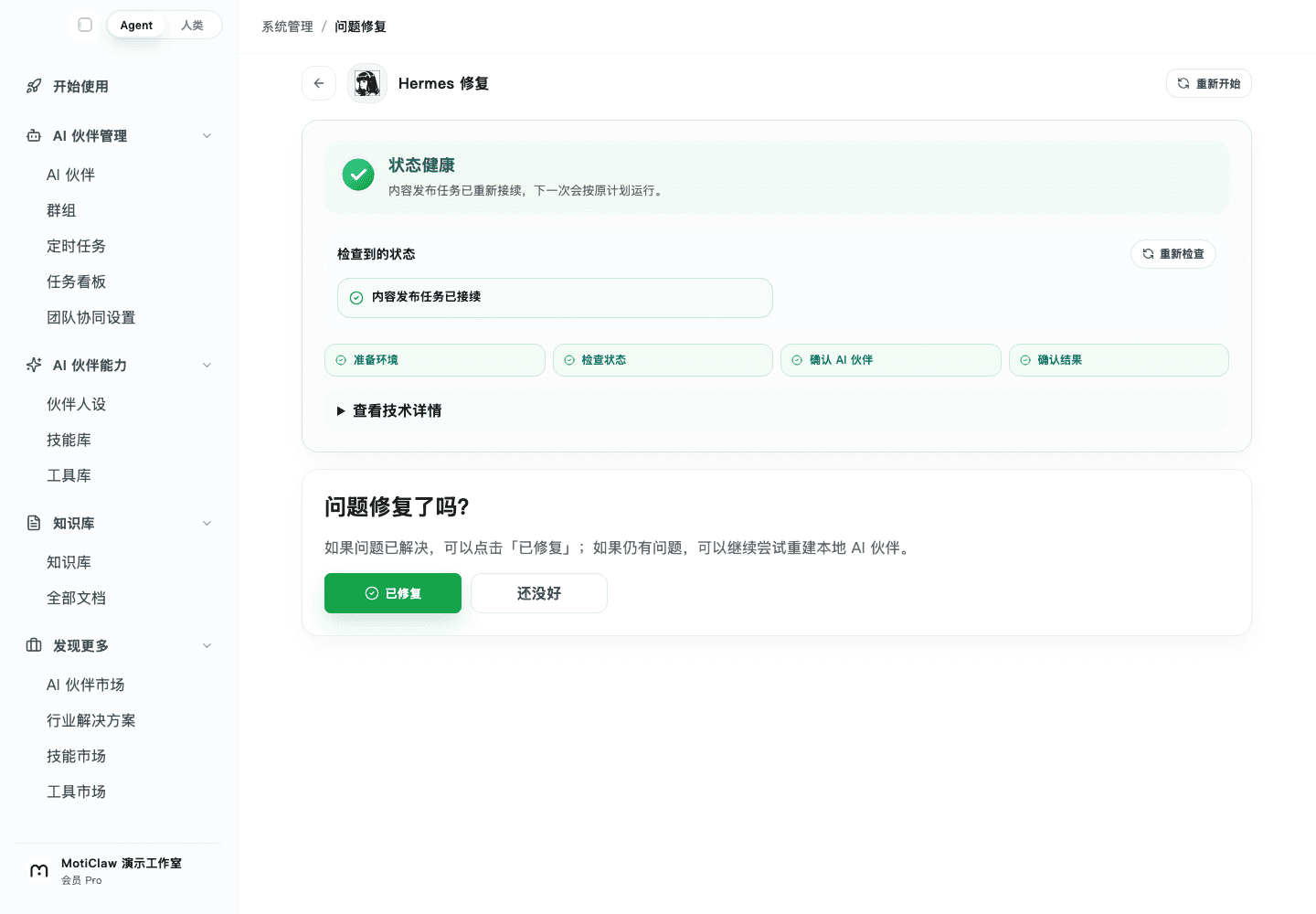
We reproduced the recovery of a publishing task with local sample data. The repair page does not treat “restart” as the outcome. It checks the environment, task state, AI partner, and final result in sequence, then still asks a person whether the problem is actually fixed. That order matters: completing the technical recovery path does not prove the business result is usable.
Before handing a recurring task to AI, add three lines to the task card: the retry limit, what change counts as progress, and the step that must stop for you. Work data stays on your device by default; only channels you connect and model calls go online as the task requires. Make failure controllable before asking automation to run for the long term.
Get your first AI partner working in 3 minutes
Download MotiClaw for free. Work data stays local by default; only the channels and model calls you connect use the network when a task needs them.
Download free