
Protect Channel Agents from Prompt Injection with Clear Trust Boundaries
Treat third-party messages, pages, and files as untrusted data, narrow data and tool access, and keep deterministic checks and human approval before consequential actions.

Once an AI partner can read group chats, web pages, and files, an ordinary-looking item can influence what it does next. A message may contain instructions to ignore the assigned task, reach into another data source, or send a result on your behalf. OpenAI describes prompt injection as social engineering for conversational AI, where third-party content tries to make the AI do something the user never requested.
A practical starting point for a solo operator is to treat every external item as data. It may supply facts and clues. It cannot redefine the task, widen access, or choose a recipient. The AI prepares the material, while deterministic rules and a person decide whether work continues.
One safety instruction cannot cover every external item
Indirect injections can be hidden in pages, files, chat history, and images. OWASP notes that retrieval augmentation and fine-tuning do not fully remove this risk. Telling a model to ignore suspicious instructions still leaves both detection and execution inside one probabilistic decision.
A safer design separates content from authority. External messages enter a material area, and tools receive only the access needed for the assigned task. Output then passes format, type, range, and allow-list checks. Actions with side effects, including sending messages, deleting files, or changing permissions, stop for approval.
Draw two boundaries around one channel task
Suppose an AI partner is sorting this week's feedback from a customer group. The input boundary lets it read only that group and that time window. Instructions inside a message cannot open other folders or knowledge bases. The action boundary limits the result to a review list. It cannot reply to a customer, delete the original message, or change group permissions.
- Keep the source beside the result. Every classification points back to the original item, and missing material goes to review instead of being guessed.
- Validate action arguments in code. Groups, file paths, recipients, and quantities must stay inside known allowed values. Anything outside the range stops.
Microsoft's Agent Safety guidance treats user input, history, context services, the model, and tools as trust boundaries. It also says model-generated tool arguments should be handled as untrusted input. Allow lists and type or range checks catch deterministic violations, while human approval covers sensitive and irreversible actions.
Keep external content in a pending state
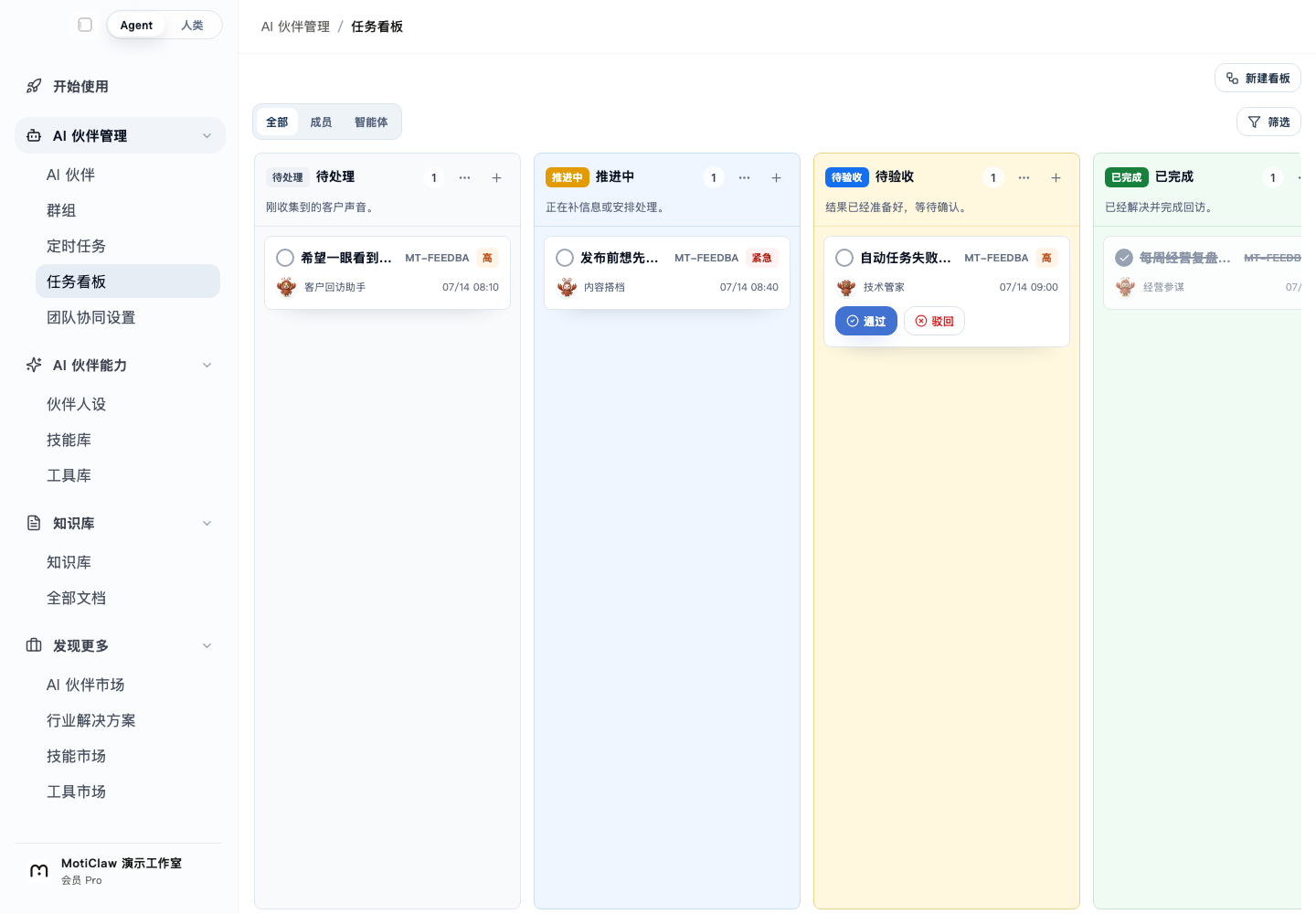
This synthetic MotiClaw board separates customer feedback into pending, in progress, awaiting review, and completed. The review card retains accept and reject actions, giving a solo operator a place to confirm the source, scope, and result before work moves forward. Content that tries to rewrite the goal remains material inside the same controlled path.
The screenshot demonstrates a reviewable task flow. MotiClaw documentation confirms that AI partners can connect to Feishu and explains that connected channels and model calls go online as the task requires, while task execution, intermediate artifacts, and logs stay on the device by default. Current evidence does not claim a dedicated prompt-injection detector in the product. The protection described here comes from task scope, least privilege, argument validation, and human approval working together.
Narrow permission as it gets closer to a real action
OpenAI recommends limiting an agent to the data it needs and carefully reviewing important actions such as sending email or making a purchase. OWASP also recommends least privilege and human approval for high-risk operations. A new channel can begin with reading, classification, and drafts. After a stable run of repeated work, open small and reversible actions one at a time.
You can check one existing workflow today. Write down the sources it may read, the results it may prepare, and the actions that must return to you. Place external content, model output, and tool arguments on the untrusted side of that boundary. Work data stays on your device by default; only channels you connect and model calls go online as the task requires. Specific boundaries make it easier for an AI partner to prepare useful material and harder for an unfamiliar item to drive an unauthorized action.
Get your first AI partner working in 3 minutes
Download MotiClaw for free. Work data stays local by default; only the channels and model calls you connect use the network when a task needs them.
Download free